
Choosing the Right Web Hosting Architecture
A comparative analysis of three AWS hosting solutions for static websites, evaluating cost, scalability, and operational complexity to determine the optimal architecture for personal portfolio sites.
When launching my personal portfolio website, I took the opportunity to explore and compare three distinct AWS hosting architectures: serverless with S3+CloudFront, containerized with ECS, and traditional VM-based with EC2. This hands-on comparison provided valuable insights into the trade-offs between simplicity, cost, and scalability for different web hosting use cases.
$0/mo
Hosting Cost (Free Tier)
3
Architectures Evaluated
Global
CDN Distribution
The Challenge
Hosting a static portfolio website seems straightforward, but choosing the right architecture requires balancing several competing factors:
- Cost Optimization: Minimizing ongoing operational costs, especially for low-traffic personal sites
- Scalability: Ensuring the solution can handle traffic spikes without manual intervention
- Global Performance: Delivering fast load times to visitors worldwide
- Operational Simplicity: Reducing maintenance overhead and complexity
- Learning Opportunity: Understanding the practical differences between serverless, containerized, and VM-based hosting
Rather than simply choosing the "obvious" solution, I wanted to implement all three approaches to gain hands-on experience with their respective strengths and weaknesses.
Architecture Comparison
Each architecture was fully implemented and tested with Infrastructure-as-Code using CloudFormation and Terraform to ensure reproducibility and consistency.
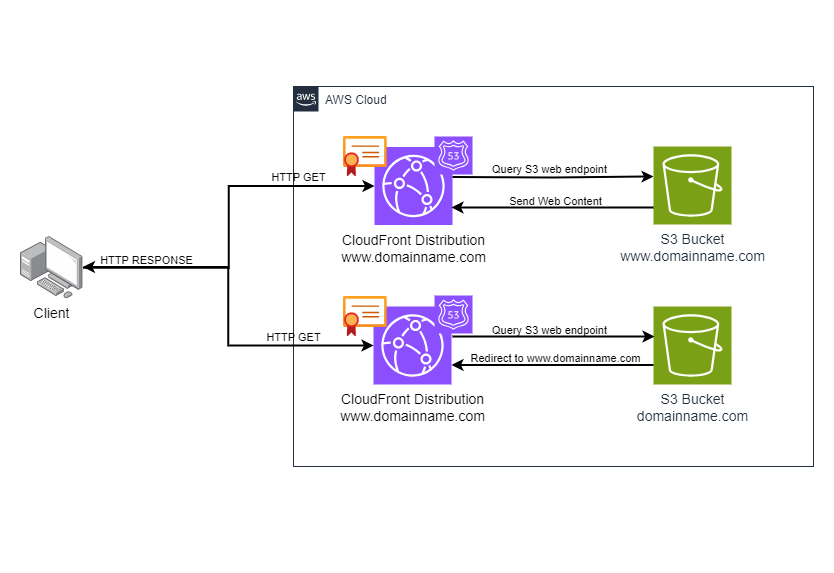
S3 + CloudFront
Serverless Static Hosting
Free tier eligible
Advantages:
- Zero operational overhead - no servers to manage
- Extremely low cost (free tier covers most personal sites)
- Global CDN distribution out of the box
- Automatic scaling to handle any traffic volume
- Simple deployment (just upload files)
- Built-in SSL/TLS with ACM
Trade-offs:
- Static content only (no server-side processing)
- Requires Route 53 for custom domains
S3 CloudFront Route 53 ACM
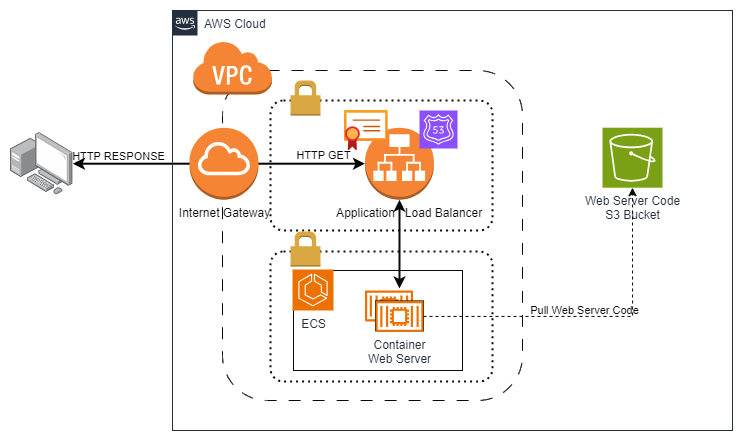
ECS Fargate
Containerized Hosting
Fargate task pricing
Advantages:
- Serverless container execution (no EC2 management)
- Can handle dynamic content with web servers
- Easy integration with ALB for load balancing
- Docker-based workflow for consistency
- Auto-scaling based on metrics
Trade-offs:
- Higher cost than S3 for static content
- More complex deployment pipeline
- Requires container registry (ECR)
- Overkill for simple static sites
ECS Fargate ECR ALB Nginx
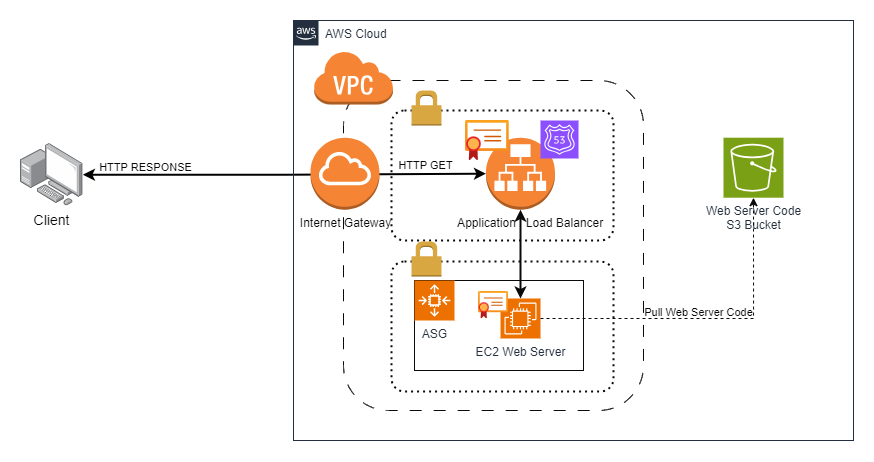
EC2 + ALB
Virtual Machine Hosting
t3.small + ALB
Advantages:
- Full control over server environment
- Can run any web server or application
- Familiar Linux/Apache/Nginx workflow
- Supports complex server-side logic
- Can be cost-effective with reserved instances
Trade-offs:
- Highest operational overhead (OS patching, security)
- Higher cost for always-on instances
- Manual scaling configuration required
- Need to manage load balancer separately
- Overkill for static websites
EC2 ALB Apache Auto Scaling
Selected Solution: S3 + CloudFront
After implementing and testing all three architectures, the S3 + CloudFront solution emerged as the clear winner for hosting static portfolio sites. The decision was driven by several key factors:
Cost Efficiency
With AWS Free Tier, the hosting cost is effectively $0/month for typical portfolio site traffic (5 GB storage, 15 GB transfer, 1M HTTP requests). Even exceeding free tier limits results in minimal costs (pennies per month).
Performance
CloudFront's global CDN distributes content across 400+ edge locations worldwide, providing sub-100ms latency for most users. No custom caching configuration needed.
Infinite Scalability
The architecture automatically handles traffic spikes from 10 to 10,000+ concurrent users without any configuration changes or performance degradation.
Zero Maintenance
No servers to patch, no containers to update, no SSL certificates to renew manually. AWS manages all infrastructure, allowing focus on content rather than operations.
Simple Deployment
Deployment is a single command: aws s3 sync ./build s3://bucket-name. CloudFront invalidation ensures updates propagate globally within minutes. The entire process integrates seamlessly with CI/CD pipelines.
Implementation Highlights
Project Information
- Project Date: July 2023
- Duration: 1 week
- Live Site: www.benwagrez.com
- Repository: GitHub Repo
Infrastructure as Code
All three architectures were implemented using Infrastructure-as-Code (IaC) to ensure consistency, reproducibility, and easy comparison:
- CloudFormation templates for S3+CloudFront
- Terraform modules for ECS Fargate setup
- Terraform for EC2 Auto Scaling Groups
Key Takeaways
Match Architecture to Use Case
The "best" architecture depends entirely on your requirements. For static content, serverless S3+CloudFront is unbeatable. For dynamic applications with complex backends, containers or VMs make more sense despite higher costs.
Operational Complexity Has Hidden Costs
While EC2 instances may seem cheaper upfront, the time spent on OS patching, security hardening, monitoring, and troubleshooting adds significant "invisible" costs. Managed services like S3 eliminate this overhead.
CDN Performance Matters Globally
CloudFront's edge locations dramatically improve load times for international visitors. A single-region EC2 instance may be fast for local users but slow for global audiences. CDN caching is essential for worldwide reach.
Infrastructure as Code Enables Experimentation
Using IaC made it trivial to spin up, test, and tear down all three architectures without risk. This approach enables safe experimentation and rapid iteration when evaluating different solutions.
Free Tier Can Host Production Workloads
AWS Free Tier is often viewed as just for learning, but it's powerful enough for real production sites. My portfolio has served thousands of visitors at zero cost, proving that small-scale production workloads can leverage free tier effectively.